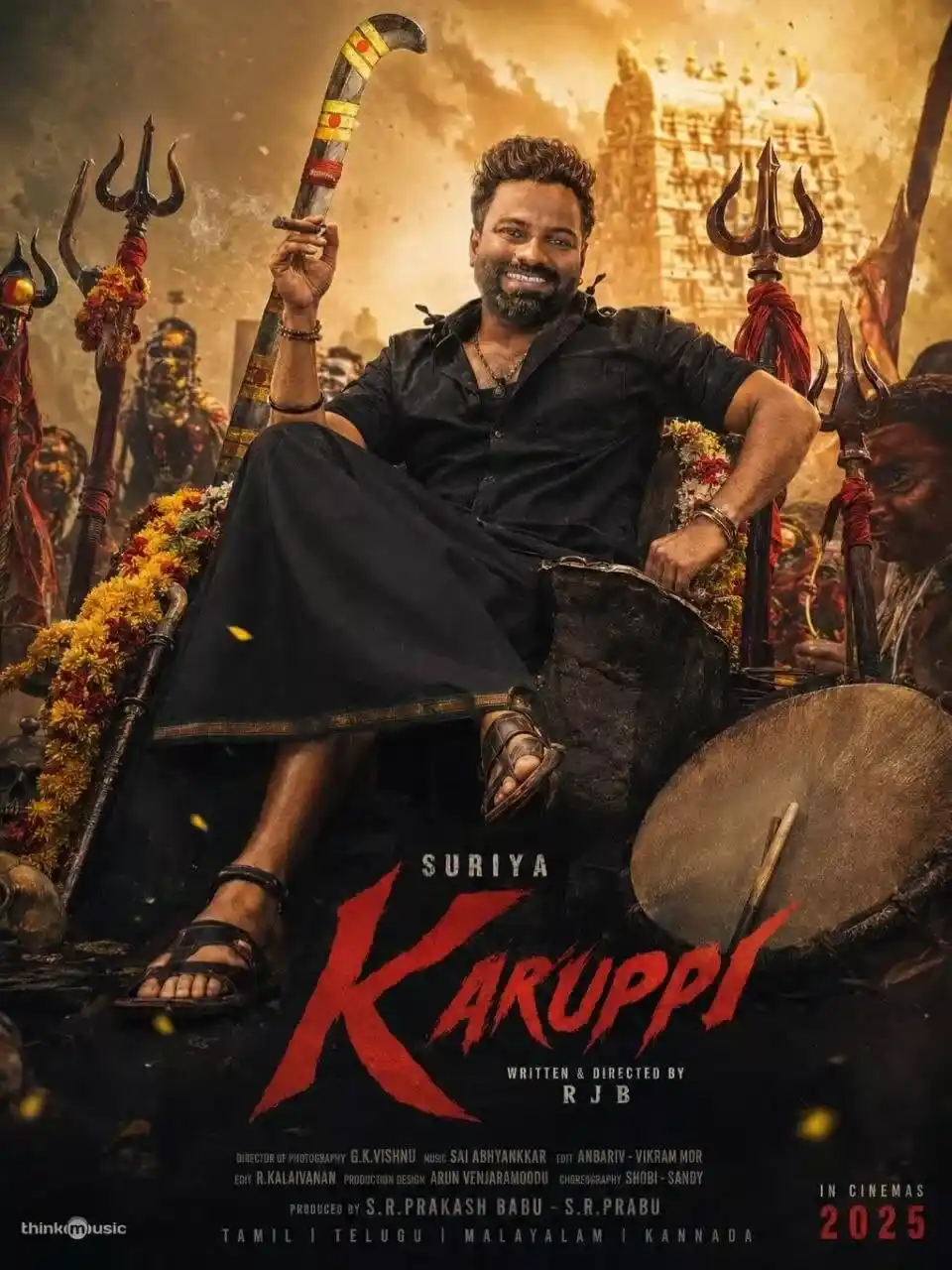
Are you a fan of Tamil movies? Do you love creating cool movie posters using AI tools? If yes, then you are in the right place! The Karuppu movie starring Suriya is one of the biggest Tamil films of 2026. Karuppu is a 2026 Indian Tamil-language fantasy action drama film directed by RJ Balaji, starring Suriya, Trisha Krishnan, and Balaji. The film’s posters look amazing, with dark backgrounds, bold lighting, and a super-mass hero feel. In this blog post, you will learn exactly how to create a Karuppu-style viral Tamil mass hero poster using AI prompts. No design skills needed. Just copy, paste, and create!
What Is a Karuppu Movie AI Prompt?
A Tamil Karuppu Movie AI Prompt is a special style of movie poster. It is bold, powerful, and cinematic. It usually has:
A dark or deep-colored background (black, red, or dark blue)
Dramatic lighting on the hero’s face
Smoke or fire effects in the background
Bold text with the movie name
A fearless, powerful expression on the hero
Karuppu movie posters follow this exact style. Suriya looks like a true mass hero in every frame.
Karuppu was released worldwide on 15 May 2026 and received mixed reviews from critics. But one thing everyone agreed on was that the posters and visual style were absolutely stunning.
The Karuppu poster editing trend is going viral on Instagram, YouTube Shorts, and Facebook Reels because:
The dark fantasy action look is very eye-catching.
People want to put their own faces on Suriya-style posters.
AI tools now make this possible in just a few seconds.
Tamil movie fans love sharing creative edits online.
Before we give you the AI prompt, let’s look at the best free AI tools you can use:
Google Gemini: Best for detailed cinematic image generation. Works great for Tamil movie poster styles.
ChatGPT (with DALL·E): Good for creative poster designs with custom text.
Adobe Firefly: Great for professional-quality poster editing.
Bing Image Creator: Free and easy to use. No account needed.
Leonardo AI: Best for high-quality, detailed movie poster images.
All these tools are free or have a free version. You do not need to pay anything to start.
Karuppu Movie AI Prompt for Viral Tamil Mass Hero Poster
Here is the main AI prompt you can use. Just copy this and paste it into any AI image tool:
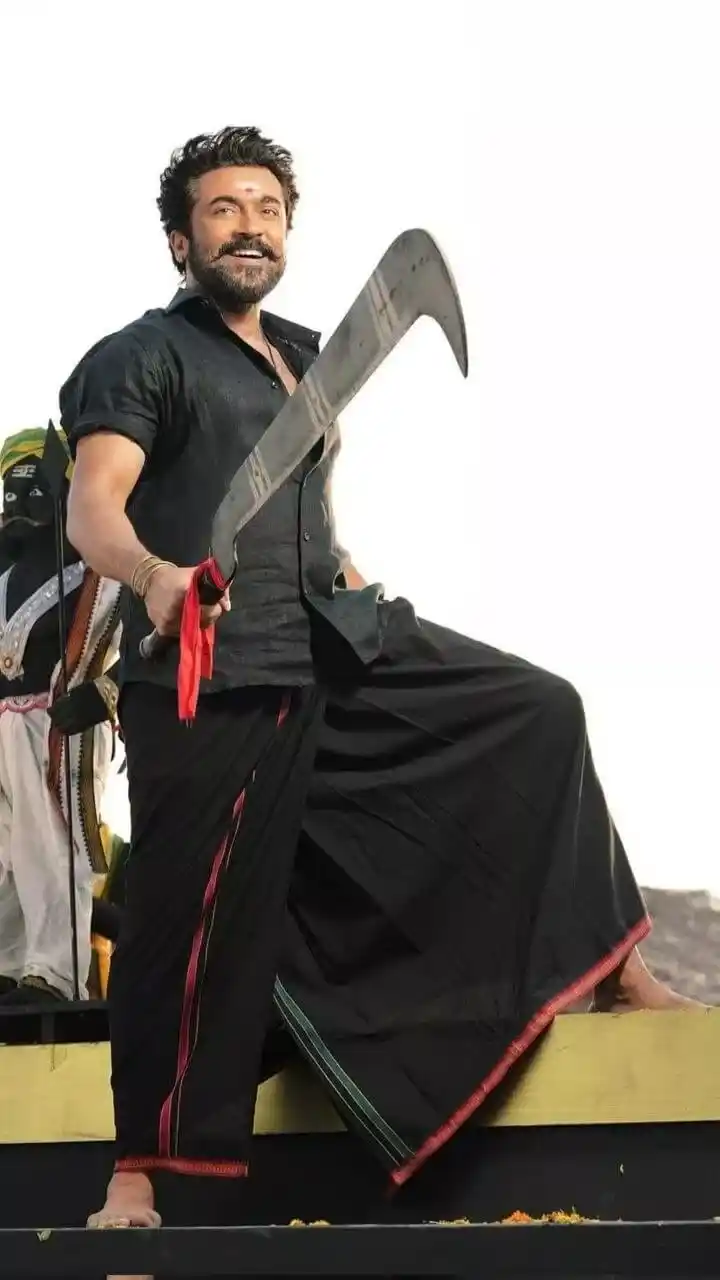
Create a full-body, vertical portrait photograph of a South Indian male warrior/folk hero standing in a powerful celebratory pose against a clean, overexposed white sky background. The subject is positioned slightly left of center, photographed from a low angle so he appears heroic and dominant. He has medium-brown skin, a broad smiling expression, thick black wavy hair swept upward and backward with loose volume, a full black beard and mustache, dark eyebrows, and a small red tilak mark centered on his forehead. His face is turned slightly toward the camera, looking forward with confidence and warmth.
He wears a black short-sleeved button-up shirt made of coarse cotton or linen fabric, slightly textured, with a relaxed fit. The shirt is open at the collar, showing a small portion of the chest, and has subtle folds and highlights across the torso. He wears a traditional black dhoti/veshti wrapped around the waist and legs, flowing dramatically outward. The fabric is deep black with visible creases and wind-swept folds. The lower border of the dhoti has a thin red trim with a faint gold/orange woven edge, and one inner fold shows a narrow green stripe. The garment forms a large triangular billowing shape to the right side of the frame as one leg is raised.
The pose: his left leg is planted firmly on a black platform at the bottom of the frame, bare foot visible, toes gripping the surface. His right leg is raised and bent, resting on a pale yellow horizontal ledge or railing that runs across the lower third of the image. His right bare foot extends to the far right edge, partially visible. His torso is upright and slightly angled. His right arm extends forward and downward toward the camera, gripping the handle of a large curved metal sickle/machete-like weapon. His left arm is partly obscured behind the raised blade and torso.
The weapon is the central foreground object: a large, heavy, dull silver-gray curved blade held diagonally from the lower left/center toward the upper right. It has a broad, flat metal body with worn scratches, discoloration, smudges, and darker stains. The blade curves upward and then hooks downward at the tip, forming a crescent-like agricultural sickle shape. Near the lower portion, the blade narrows into a handle area wrapped or held in dark material. A vivid red cloth strip is tied around the handle, hanging downward in two loose ribbons. The weapon should appear oversized and close to the camera, partially obscuring the subject’s torso.
Add simple gold bangles on the subject’s right wrist. Keep the lighting bright, natural, and high-key, with strong white background and soft shadows on the clothing. The color palette should be mostly black, white, gray, pale yellow, red accents, and natural skin tones.
In the left background, partially cropped and out of focus, include a decorative folk horse prop or festival figure: black and white body, green/yellow head covering, red and patterned trim, and a curved painted element. It should be mostly hidden behind the main subject, visible only along the left edge. The foreground base should include a black stage/platform along the bottom edge with a few small scattered yellow-orange flower petals. The composition should be cinematic, energetic, and heroic, with the flowing dhoti and diagonal blade creating strong movement. Use realistic photography, sharp focus on the man and weapon, shallow background detail, vertical 2:3 aspect ratio, no text, no watermark.
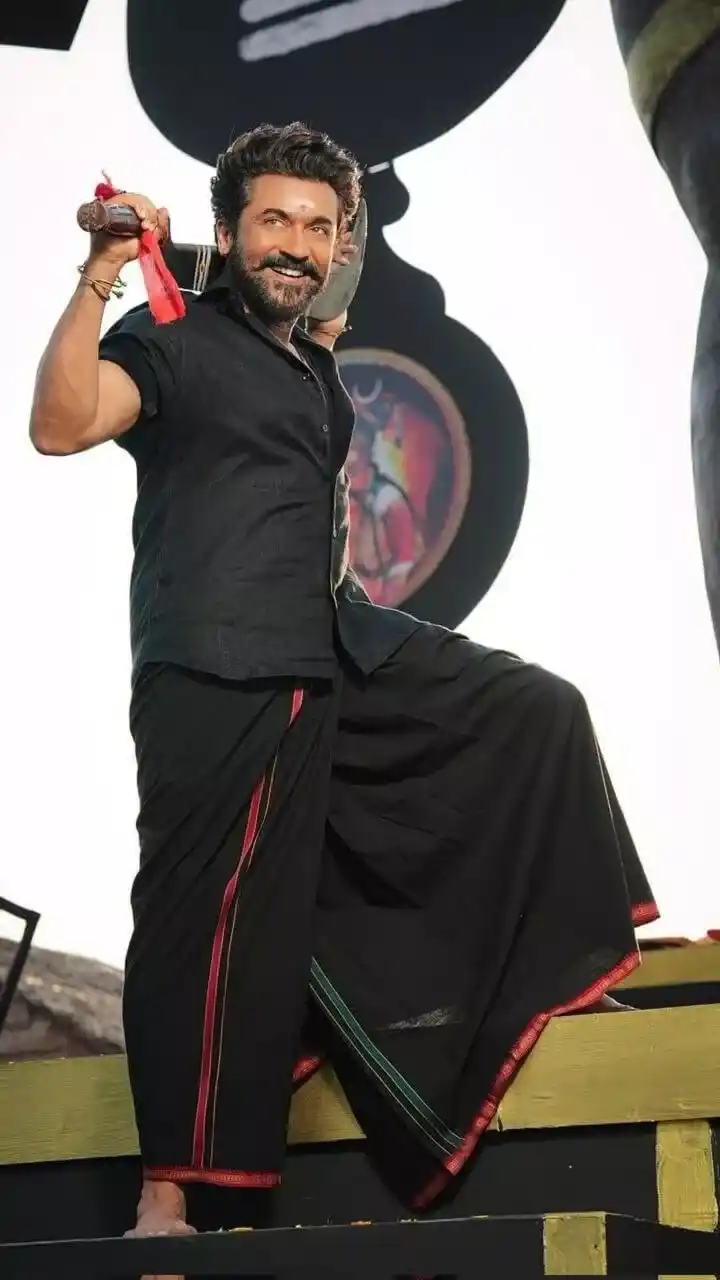
Create a realistic vertical portrait photograph of a South Indian male warrior/folk hero standing in a dynamic heroic pose on a festival-style platform, photographed from a low angle. The composition is vertical, approximately 2:3 aspect ratio, with the subject occupying the left and center portions of the frame. The background is mostly a bright, overexposed white sky, creating a high-contrast silhouette effect around darker objects.
The man has medium-brown skin, thick black wavy hair styled upward and backward with volume, a full black beard and thick mustache, dark eyebrows, and a broad confident smile. He looks directly toward the camera with an energetic, celebratory expression. A small pale red or pinkish tilak mark is centered on his forehead. His face is warmly lit, with natural skin highlights and soft shadowing around the eyes, beard, and cheekbones.
He wears a black short-sleeved button-up shirt made from coarse cotton or linen-like fabric. The shirt has a matte texture, subtle vertical weave, and visible creases across the chest and abdomen. The collar is open slightly at the neck, and the shirt fits close but not tight. The sleeves end above the elbows. He wears simple thin metal bangles on both wrists.
He is dressed in a traditional black dhoti/veshti wrapped around the waist and legs. The fabric is deep black with strong folds, pleats, and heavy draping. A narrow vertical red stripe runs down the front fold near the center-left of the garment. Along the lower edge is a red border with a thin gold/orange woven trim. On the raised draped section near the lower center, include a narrow green double stripe running diagonally downward. The dhoti fabric spreads broadly over the raised right leg, forming a large dark triangular drape with crisp folds and a slightly glossy highlight near the lower middle.
Pose and body placement: the man stands with his left leg straight and planted on a black platform at the bottom of the image; his left bare foot is visible near the lower left. His right leg is raised and bent at the knee, resting on a pale yellow horizontal wooden railing that crosses the lower third of the frame. The raised knee creates a strong angular silhouette, and the black dhoti covers most of the leg. His torso leans slightly backward and to the left, emphasizing a proud stance.
His right arm is raised high behind his shoulder, bent at the elbow, gripping the handle of a large curved metal sickle or machete-like weapon. The handle is visible near the upper left, cylindrical and brown/wooden with metal bands, and a bright red cloth strip is tied to it, hanging downward in two loose ribbons. The blade curves behind his head and shoulder, partially visible as a dull silver-gray crescent-like shape. The blade should appear worn, with scratches and muted reflections. His left arm is bent upward near the side of his head, partly hidden behind the blade and body, with the left hand near the ear or back of the head.
Behind him, include a large black decorative folk horse or festival prop silhouette occupying the upper center and left background. It should be mostly black with a rounded head-like form and neck shape, plus a colorful circular medallion or painted ornament at the center behind the man’s torso. The medallion is muted red, pink, yellow, and blue, blurred and partially obscured. On the far right edge, include a cropped vertical gray-green cylindrical or sculptural element, out of focus, entering from the top and continuing downward. At the lower left background, include a low dark rocky or roof-like texture beneath the white sky.
The platform consists of a pale yellow wooden railing across the lower third and a black base at the very bottom. Add a vertical pale yellow support beam on the right side beneath the railing. Scatter a few tiny yellow-orange flower petals on the black platform near the man’s feet. Lighting should be bright natural daylight with strong backlighting from the white sky, producing crisp contrast on the black clothing while retaining fabric detail.
Use realistic photography, sharp focus on the man, slight background blur, cinematic heroic framing, no text, no watermark.
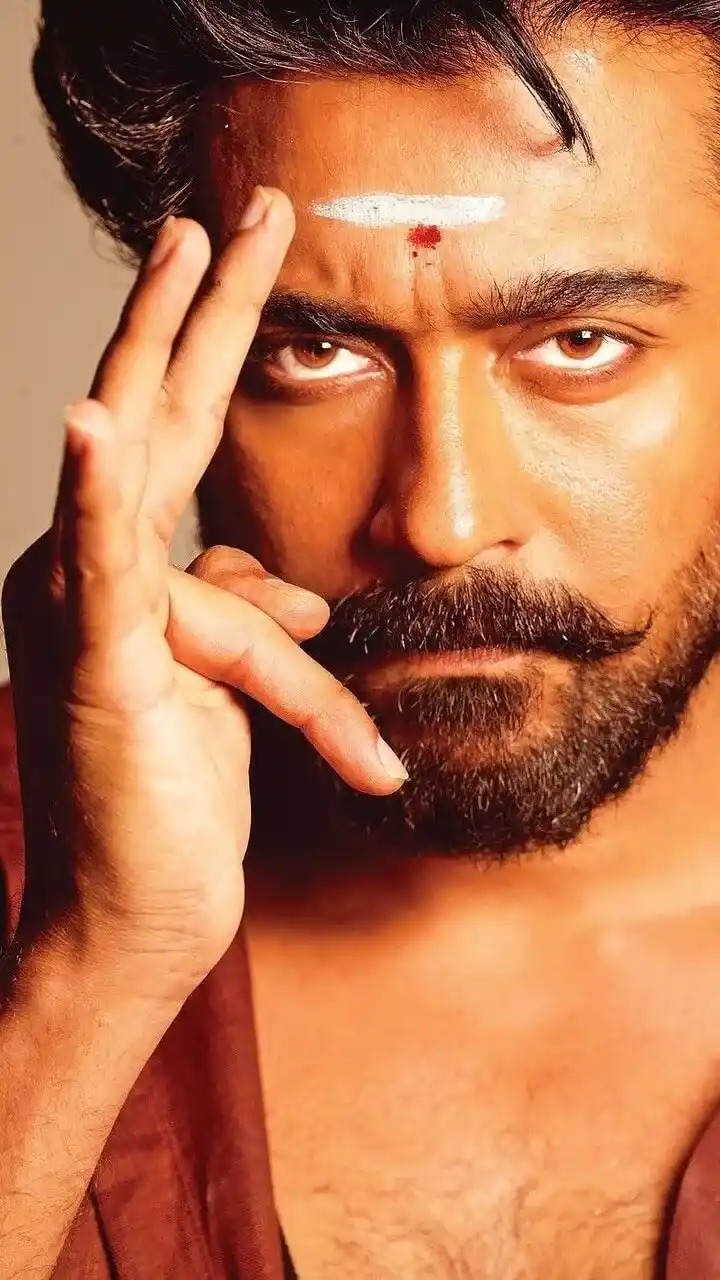
Create an extreme close-up vertical portrait photograph of a South Indian man’s face and upper chest, framed tightly from the top of the hairline to just below the collarbone. The composition is intense, symmetrical, and cinematic, with the face filling almost the entire frame. Use a vertical 2:3 aspect ratio.
The man has warm medium-brown skin with a golden-orange cast from strong studio lighting. His expression is serious, focused, and commanding. He looks directly into the camera with narrowed, intense brown eyes. The eyes should be sharply detailed, with small catchlights and visible reddish-brown irises. His eyebrows are thick, black, slightly arched, and strongly defined. The brow is subtly furrowed, creating a stern gaze.
His hair is thick, black, and glossy, swept back from the forehead with a few loose strands falling downward near the upper right side of the forehead. The hairline is visible at the top of the frame, and the hair has strong highlights from the warm light. He has a dense black beard covering the lower face and jaw, with a full mustache styled slightly outward and curled upward at the ends. The beard texture is coarse and detailed, with individual hairs visible around the cheeks, chin, and jawline.
On the center of his forehead, place a horizontal white sacred ash mark: a thick, slightly uneven white stripe stretching across the forehead above the eyebrows. The stripe should have a powdery, matte texture with soft smudged edges and tiny speckled imperfections. Directly below the center of the white stripe, add a small red kumkum dot, deep crimson red, slightly irregular and powdery, with a faint vertical red smudge trailing downward.
His left hand is raised beside his face in the foreground, occupying the left side of the frame. The hand is close to the camera and slightly larger due to perspective. The index and middle fingers are extended upward together in a vertical gesture, positioned near the left temple and forehead. The ring finger and little finger are bent inward, and the thumb curves across the palm near the mouth level. The fingertips are softly rounded with natural nails. The hand is warmly lit, with visible skin texture, knuckles, and soft shadows between the fingers. The hand partially obscures the left side of his face and cheek.
The man’s shoulders and upper chest are visible at the bottom of the frame. He appears bare-chested, with natural chest hair visible at the center. A dark maroon or deep reddish-brown cloth is draped loosely over both shoulders, visible along the lower left and lower right edges. The cloth has a soft matte fabric texture and creates a dark contrast against the warm skin.
Lighting should be dramatic and warm, with strong golden-orange highlights on the forehead, nose bridge, cheekbones, and hand. Shadows should be deep but not fully black, especially under the brow, around the beard, and along the left side of the face. The background should be plain and softly blurred, in a muted beige or warm tan color. Use shallow depth of field but keep the eyes, forehead mark, and front hand gesture crisp. The image should feel like a high-resolution studio portrait with intense devotional and heroic styling. No text, no watermark, no jewelry, no extra objects.
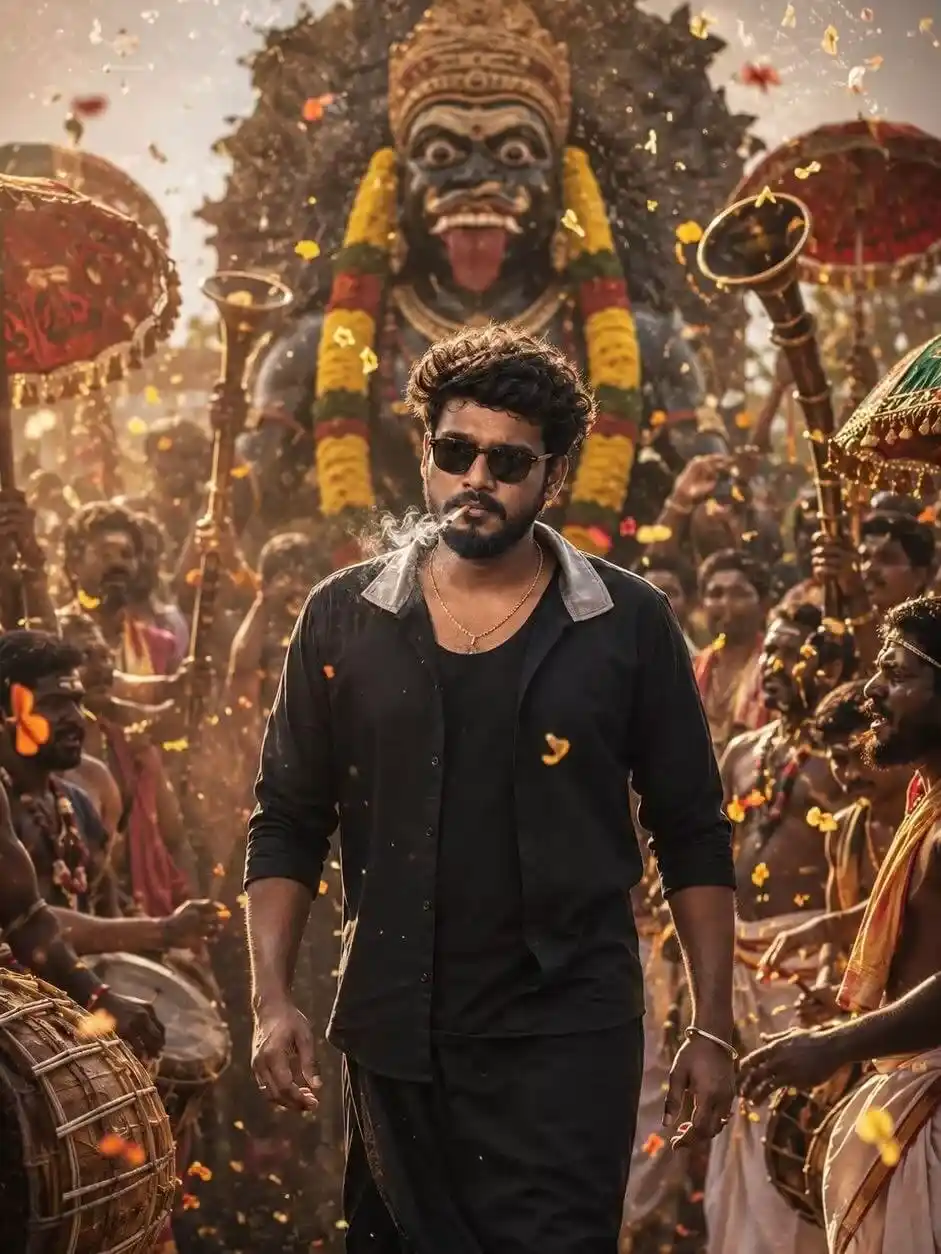
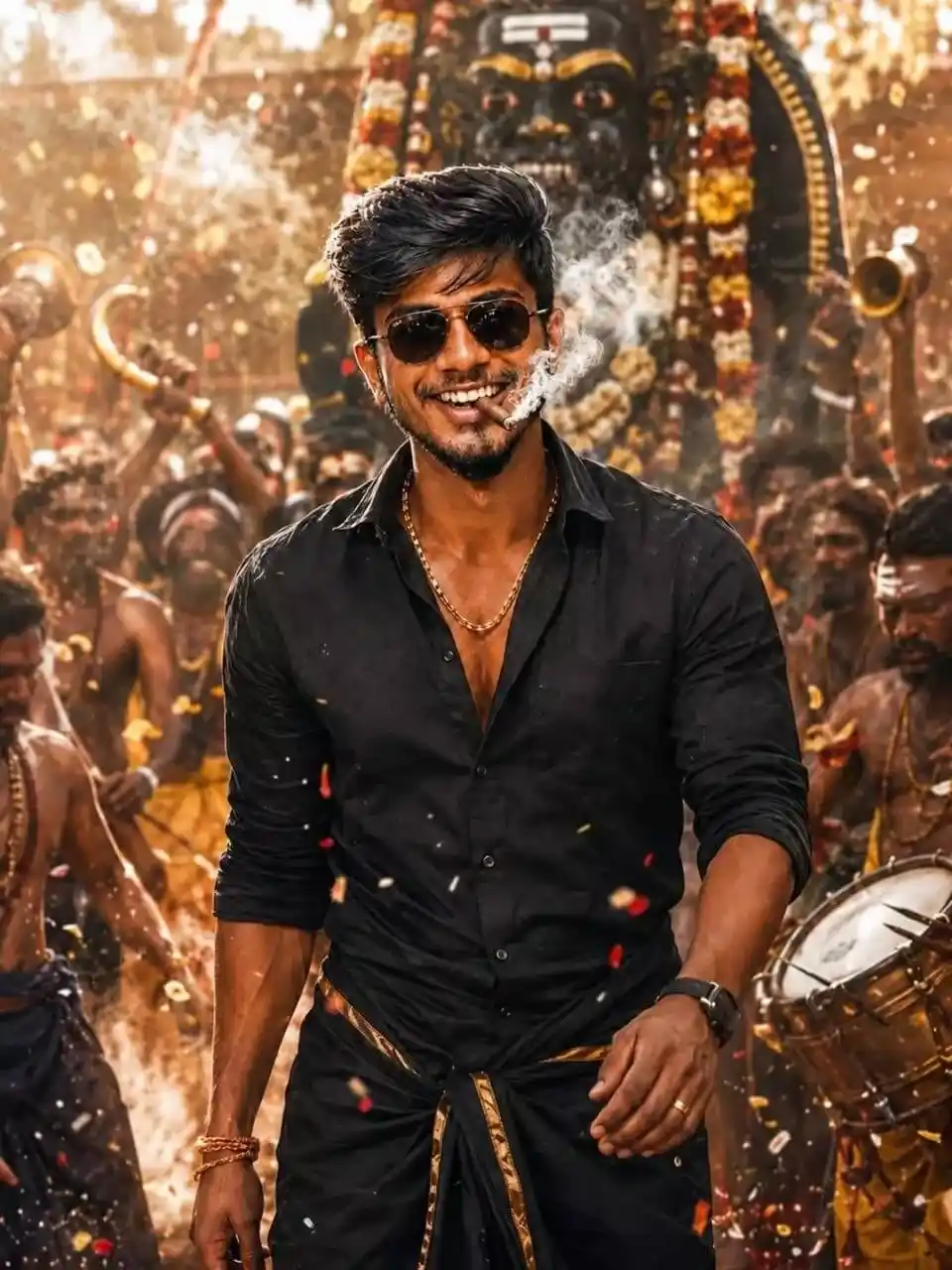
Create an ultra-realistic cinematic festival poster using my face reference (100% exact match, no changes). Face must be preserved exactly (no editing, no beautifying, no AI modification, natural skin texture, same expression). Identity lock
Scene: South Indian mass hero walking confidently in a traditional festival procession. Wearing black shirt + black veshti, sunglasses, cigar with smoke.
Surroundings: getup of lord karuppusamy, folk performers, drummers, kombu horns, garlands, flowers, energetic crowd.
Cinematic: low angle hero shot, depth of field, motion blur crowd, flying petals, dust, HDR, teal-orange grading.
Lighting: golden hour, rim light, high contrast shadows.
Camera: 85mm, f/1.8, ultra HD, sharp focus on face.
Style: hyper-realistic, cinematic movie poster, Tamil mass intro vibe.
Important: Face must blend naturally, NO distortion, NO AI-generated face. take a second image as a reference.
Create an ultra-realistic cinematic festival poster using my face reference (100% exact match, no changes). Face must be preserved exactly (no editing, no beautifying, no AI modification, natural skin texture, same expression). Identity lock
Scene: South Indian mass hero walking confidently in a traditional festival procession. Wearing black shirt + black veshti, sunglasses, cigar with smoke.
Surroundings: getup of lord karuppusamy, folk performers, drummers, kombu horns, garlands, flowers, energetic crowd.
Cinematic: low angle hero shot, depth of field, motion blur crowd, flying petals, dust, HDR, teal-orange grading.
Lighting: golden hour, rim light, high contrast shadows.
Camera: 85mm, f/1.8, ultra HD, sharp focus on face.
Style: hyper-realistic, cinematic movie poster, Tamil mass intro vibe.
Important: Face must blend naturally, NO distortion, NO AI-generated face. take a second image as a reference.
Create an ultra realistic cinematic festival poster using my face reference (100% exact match, no changes). Face must be preserved exactly (no editing, no beautifying, no AI modification, natural skin texture, same expression). Identity lock ON.
Scene: South Indian mass hero walking confidently in a traditional festival procession. Wearing black shirt + black veshti, sunglasses, cigar with smoke.
Surroundings: getup of lord karuppusamy, folk performers, drummers, kombu horns, garlands, flowers, energetic crowd.
Cinematic: low angle hero shot, depth of field, motion blur crowd, flying petals, dust, HDR, teal-orange grading.
Lighting: golden hour, rim light, high contrast shadows.
Camera: 85mm, f/1.8, ultra HD, sharp focus on face.
Style: hyper-realistic, cinematic movie poster, Tamil mass intro vibe.
Important: Face must blend naturally, NO distortion, NO AI-generated face. take a second image as a reference.
Karuppu Movie AI Prompt Copy Paste
Karuppu Movie AI Prompt Copy Paste gives you ready-to-use prompts that you can easily copy and paste into any AI image generator. These prompts are designed to create a dark, cinematic, powerful Tamil mass hero poster look with realistic lighting, intense expressions, black outfit styling, and dramatic movie-poster effects. They are perfect for Instagram Reels, profile pictures, thumbnails, and viral AI photo edits.
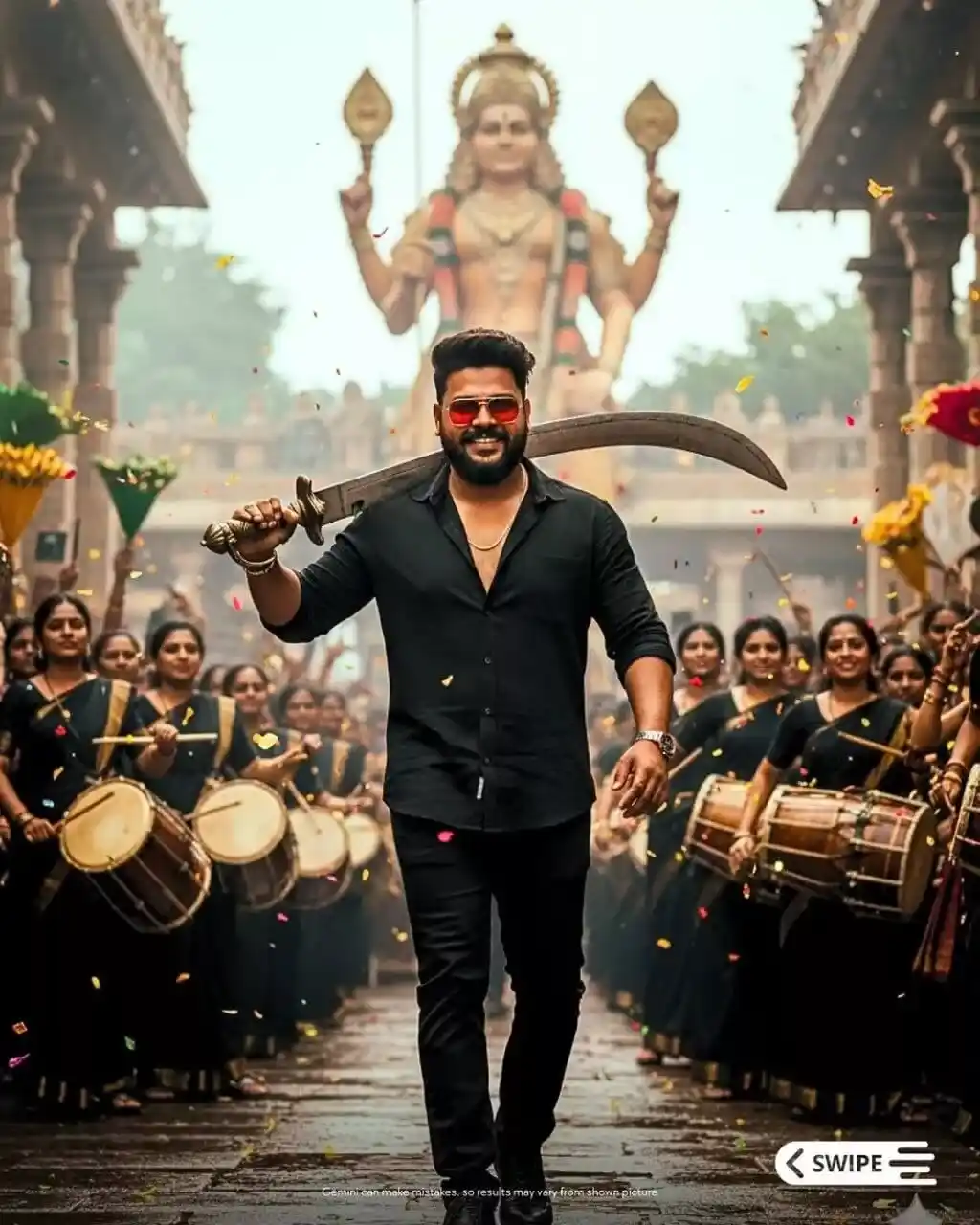
Create a South Indian festival street procession captured in a heroic celebration tone. The atmosphere is vibrant, powerful, and culturally rich, filled with energy and festive chaos. The time of day is midday under an overcast tropical sky, with a humid, diffused haze that gives a cinematic softness to the background.
In the background, enormous temple pillars with intricate carvings stand behind a gigantic deity statue holding traditional weapons. Colorful banners and yellow flower petals drift through the air while women drummers dressed in black sarees celebrate energetically behind the hero. The wet stone street below reflects ambient daylight, adding subtle reflections and texture.
Foreground / Main Subject:
A confident South Indian man in his 20s, fit and lean-muscular, strides forward through the crowd in a full-body shot up to the legs. He carries a massive curved sword resting on his shoulder, exuding charisma and dominance.
His pose is mid-stride, one arm slightly outward for balance, and he wears a swag smile with effortless confidence.
• Expression: Confident smile, swagger, charisma.
• Hair: Wavy, wind-blown, high volume, dark black-brown colour.
• Facial Hair: Thick beard and Mustache, neatly styled.
• Eyes: Hidden behind red-tinted aviator sunglasses.
• Accessories: Red sunglasses, thin gold neck chain, and bracelets on both wrists.
• Outfit: Black half-sleeve shirt, unbuttoned at chest; dark trousers (footwear not visible).
• Props: Massive curved sword, floating flower petals around him.
The hero radiates cultural pride and cinematic presence, appearing as the focal point of the celebration.
Camera and Cinematic Composition:
Captured in a low-angle mid-shot — a heroic upward perspective emphasizing dominance and grandeur.
The subject is centered tightly in frame, with moderate depth-of-field — hero sharply focused, background crowd slightly blurred.
Camera Specs:
• Focal length: 35 mm
• Aperture: f/8
• Sensor: Full-frame
• Focus: Hero’s face and sword hilt
• Motion blur: High, conveying dynamic movement
Film & Grading:
• Film stock emulation: Kodak Vision3 500T
• Colour grade LUT: Kodak 2383 print emulation
• Contrast: Medium-high with lifted shadows
• Exposure bias: +0.3 EV
• Grain: Fine organic film grain, cinematic texture
Lighting Design:
Soft natural daylight with diffused overcast light, coming from overhead and front-left.
Subtle ambient fill bounces from the crowd and wet street, keeping tones neutral with a faint warm tint.
Reflections glint gently on the sword’s blade and sunglasses, highlighting key details without overpowering contrast.
Colour Palette:
• Dominant tones: Earthy browns, muted greys, tan skin tones.
• Accent colours: Red sunglasses, gold jewellery, green leaves, yellow petals.
• Colour grading: Filmic contrast with warm highlights, rich midtones, and desaturated shadows for cinematic realism.
Overall Style & Keywords:
Cinematic action poster • Heroic presence • Cultural pride • Ultra-realistic filmic rendering • Volumetric depth • Poster composition • Dynamic energy • Fine-grain Kodak film texture • Balanced warm tone
Final Output Instruction for Gemini Nano:
Generate a photorealistic 8K 4:5 cinematic poster of the described scene. Ensure hyper-real textures, fine-grain fidelity, and sharpness in the hero’s facial features (eyes, nose, mouth, beard, hair) precisely matching the provided reference image. Maintain balanced color warmth, filmic depth, and heroic visual composition consistent with a Kodak-style cinematic poster.
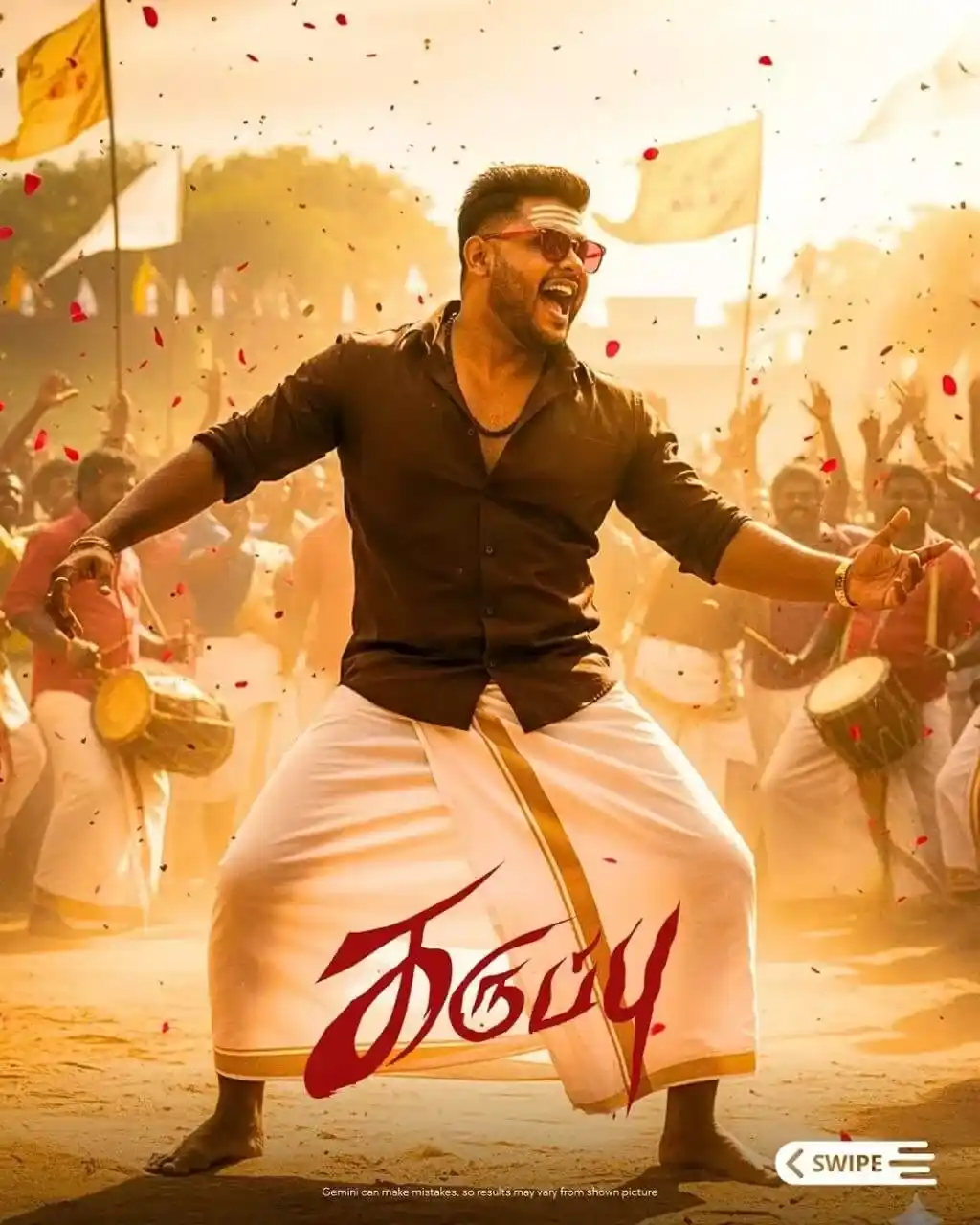
Create a cinematic festival street dance scene in rural Tamil Nadu, captured during golden hour. A strong South Indian man in his late 20s stands mid-dance with legs apart and arms wide, shouting joyfully in a moment of powerful expression. He wears a dark brown shirt with rolled-up sleeves and a traditional white veshti (dhoti) with a golden border, barefoot on dusty ground. His forehead is marked with bold horizontal vibhuti lines, and he wears red sunglasses, a black chain, and a wrist bracelet.
Behind him, a large group of men in similar traditional attire play drums and cheer, surrounded by red flower petals floating through the air. Yellow temple flags wave in the background under warm sunlight. The atmosphere is charged with cultural pride, rhythm, and festive energy.
The camera captures a low-angle medium full-body shot, creating a heroic and dominant perspective. The DSLR lens (35mm) gives a shallow depth of field, focusing sharply on the dancer while softly blurring the cheering crowd and flags.
Lighting is cinematic golden hour backlight, with warm amber tones, high contrast, glowing rim light outlining the subject, and soft dust haze catching the sunlight. The air feels alive with movement — petals, dust, rhythm, and sunlight blending in a powerful celebratory composition.
Color palette: golden yellow, red, brown, and white, with warm highlights and festive energy.
Mood: vibrant, heroic, joyous, and culturally charged.
Keywords: Tamil festival, cinematic poster, traditional dance, South Indian energy, golden hour, cultural celebration, shallow focus, motion freeze, petals, drums, heroic stance.
This photorealistic, ultra-high resolution image should be in a 4:5 aspect ratio and 8k quality, hyper-detailed with grains and sharpness. Ensure the facial features match perfectly, including the eyes, nose, mouth, eyebrows, ears, and each and every facial feature, as in the reference image that I uploaded.
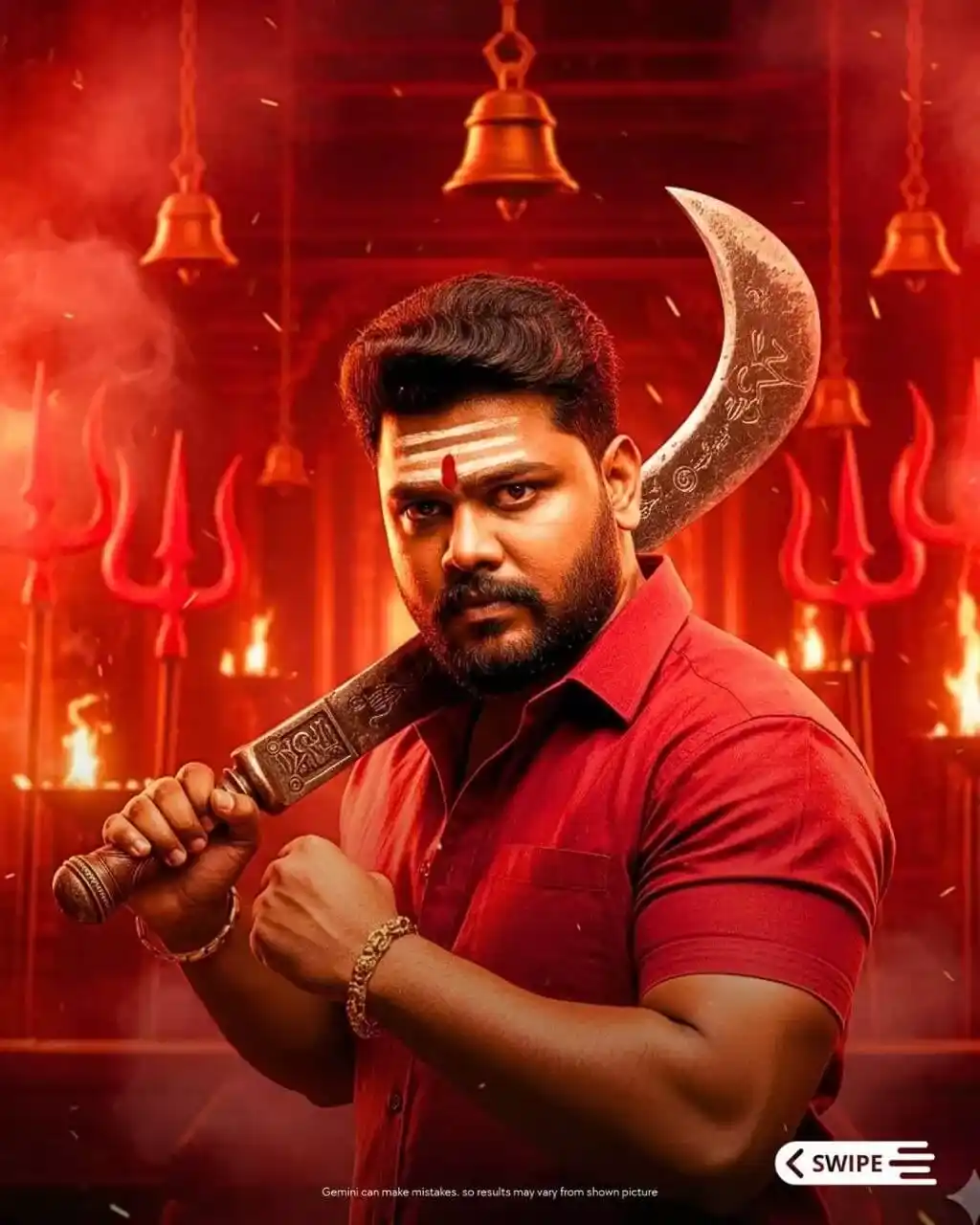
Create an ultra-realistic, cinematic poster image titled “Ritual Warrior”, themed around divine vengeance and heroism.
Scene Description:
A Tamil ritual warrior stands in front of a folk temple backdrop filled with red-hued tridents (vels), hanging temple bells and swirling ritual smoke. The ground and air carry a ritualistic atmosphere, with burning torches, floating embers, and a diffused sacred incense haze that radiates divine energy. The overall tone is intense, fiery, spiritual, and heroic, evoking a sense of ancient power and mythic reverence.
Environment & Setting:
The location style is that of a Tamil cultural ritual ground, featuring rows of tridents, sacred symbols, and a temple altar aura glowing in deep crimson and fiery orange.
Props include:
• A large ritual machete (billhook) engraved with ancient markings.
• Sacred ash tilak on the forehead.
• Temple bells, flaming torches, and dense incense smoke.
• The colour palette is dominated by deep crimson, fiery orange, rustic brown, and shadow black — symbolizing devotion, strength, and divine rage.
Main Subject (Character):
A male warrior in his 20s, fit and muscular, exuding divine intensity.
• Facial features: sharp, commanding eyes with thick beard and Mustache.
• Expression: stern and fierce, filled with spiritual determination.
• Hair: grown-out, wavy black hair flowing naturally.
• Accessories: white tilak (forehead mark) and a gold bracelet on his right hand.
• Outfit: red cotton half-hand shirt, slightly wrinkled and ritual-stained.
• Pose: right arm flexed, gripping a massive billhook machete resting across his shoulder; torso slightly angled left toward the camera, radiating dominance and readiness.
Camera Setup:
• Angle: medium close-up, slightly low angle to emphasize power and heroism.
• Framing: centred composition, full focus on the warrior’s upper body and expression.
• Lens: cinematic 50mm, capturing depth and isolation from background.
• Depth of Field: shallow — background blurred, subject razor-sharp.
Lighting Design:
• Style: dramatic high-contrast cinematic lighting.
• Key Light: warm red-orange glow from the front-left side, highlighting the warrior’s face and right shoulder.
• Back Light: subtle rim light separating the silhouette from the red smoke and temple backdrop.
• Ambient: soft, diffused red ritual haze that fills the space with mystic warmth.
Colour Grading:
• Tone: ritual red-orange hue dominance.
• Contrast: strong midtone depth.
• Highlight emphasis: metallic reflections on the machete and skin sheen from sweat and ritual fire.
Atmospheric & Particle Effects:
• Smoke: thick incense haze swirling through the air.
• Particles: glowing embers and floating dust.
• Light Rays: warm shafts of light diffused through haze, tridents, and bells — adding divine cinematic radiance.
Mood Output:
A cinematic still capturing ritual divinity fused with vengeance, a Tamil folk-warrior hero standing between fire and faith, with sacred ferocity and mythic presence.
This photorealistic, ultra-high resolution image should be in a 4:5 aspect ratio and 8k quality, hyper-detailed with grains and sharpness. Ensure the facial features match perfectly, including the eyes, nose, mouth, eyebrows, ears, and each and every facial feature, as in the reference image that I uploaded.
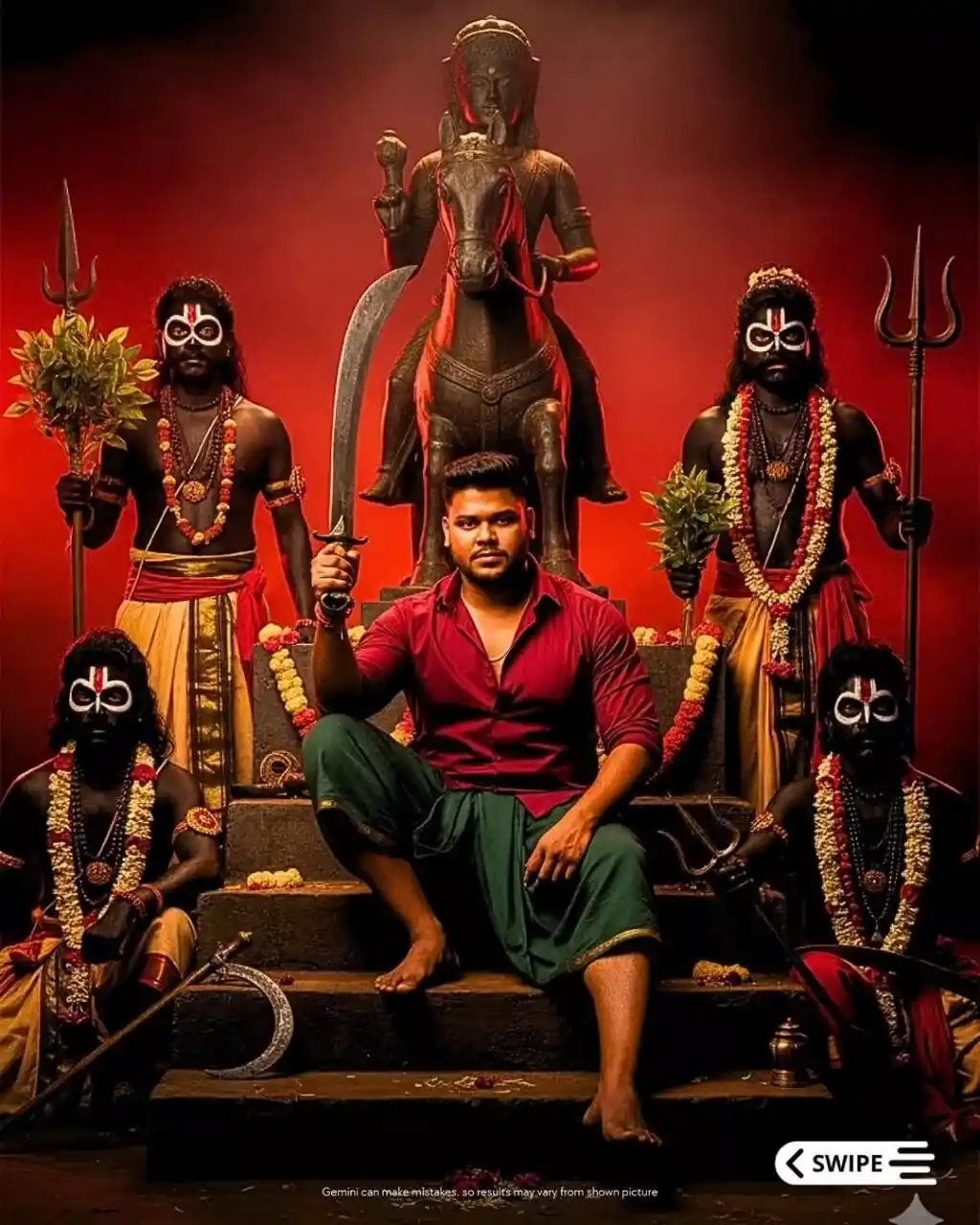
Create a hyper-realistic, cinematic poster tableau depicting a heroic ritual throne scene set in a Tamil folk festival or sacred ritual environment.
The setting is a dark earthen stage with a deep red ceremonial backdrop, filled with dense red smoke and ritual fire haze. The atmosphere radiates mystical, divine, and ritualistic energy — a moment charged with ancient cultural power.
At the center, the male protagonist sits confidently on stone steps, his body slightly tilted left, head angled upward and turned slightly left, and eyes looking directly at the camera with a stern, composed expression that conveys dominant calm authority.
He wears a red half-sleeve shirt unbuttoned slightly and a dark green lungi folded at the knees, accessorized with a neck chain and bracelet.
His hair is wavy, thick, and styled back, with a beard and mustache, and a medium warm skin tone illuminated by cinematic light.
In his right hand, he holds a massive curved sword resting on his shoulder, symbolizing strength and legacy.
Flanking him on both sides are four ritual performers in tribal deity-inspired costumes, painted in black with white and red markings, adorned with garlands, beads, and weapons.
They hold leaf branches, ritual staffs, and tridents, their faces intense and trance-like, as if possessed by spiritual energy.
Behind the throne, in the background center, stands a large deity statue — a warrior god on horseback, sculpted from dark stone or bronze, radiating a symbolic guardian aura through the haze and firelight.
The environment includes ancient weapons (sickles, spears, tridents) placed around, flower garlands, holy ash, and turmeric markings on the stage floor.
The weather feels dry and smoky, with the air shimmering in warm red glow from ritual fires and embers drifting upward.
Camera & Composition:
Shot at eye-level frontal composition with a medium telephoto lens (77mm equivalent).
The frame captures a full-body group portrait centered precisely on the protagonist.
The depth of field is moderate — sharp focus on the characters, with the background softly blurred by red haze.
Composition is strongly symmetrical, guiding the visual flow from the central hero upward to the deity statue, evoking a grand, mythic hierarchy of power and reverence.
Lighting:
Use dramatic cinematic lighting — soft overhead and side warm lights, enhanced by subtle red ambient reflections from the fiery background.
Maintain high contrast with defined shadows, and apply rim lighting that outlines silhouettes and weapon edges for visual drama and sacred intensity.
Color Palette:
Dominant tones: deep red, black, bronze, and earthy brown.
Accent hues: gold, green leaves, and skin tone highlights.
Overall mood: fiery, divine, powerful, and ritualistic, blending the sacred with cinematic grandeur.
Visual Tone:
The final image should evoke grand mythic energy, cultural authenticity, and ritual heroism — like an epic Tamil folklore film poster, infused with sacred firelight, divine aura, and warrior symbolism.
This photorealistic, ultra-high resolution image should be in a 4:5 aspect ratio and 8k quality, hyper-detailed with grains and sharpness. Ensure the facial features match perfectly, including the eyes, nose, mouth, eyebrows, ears, and each and every facial feature, as in the reference image that I uploaded.
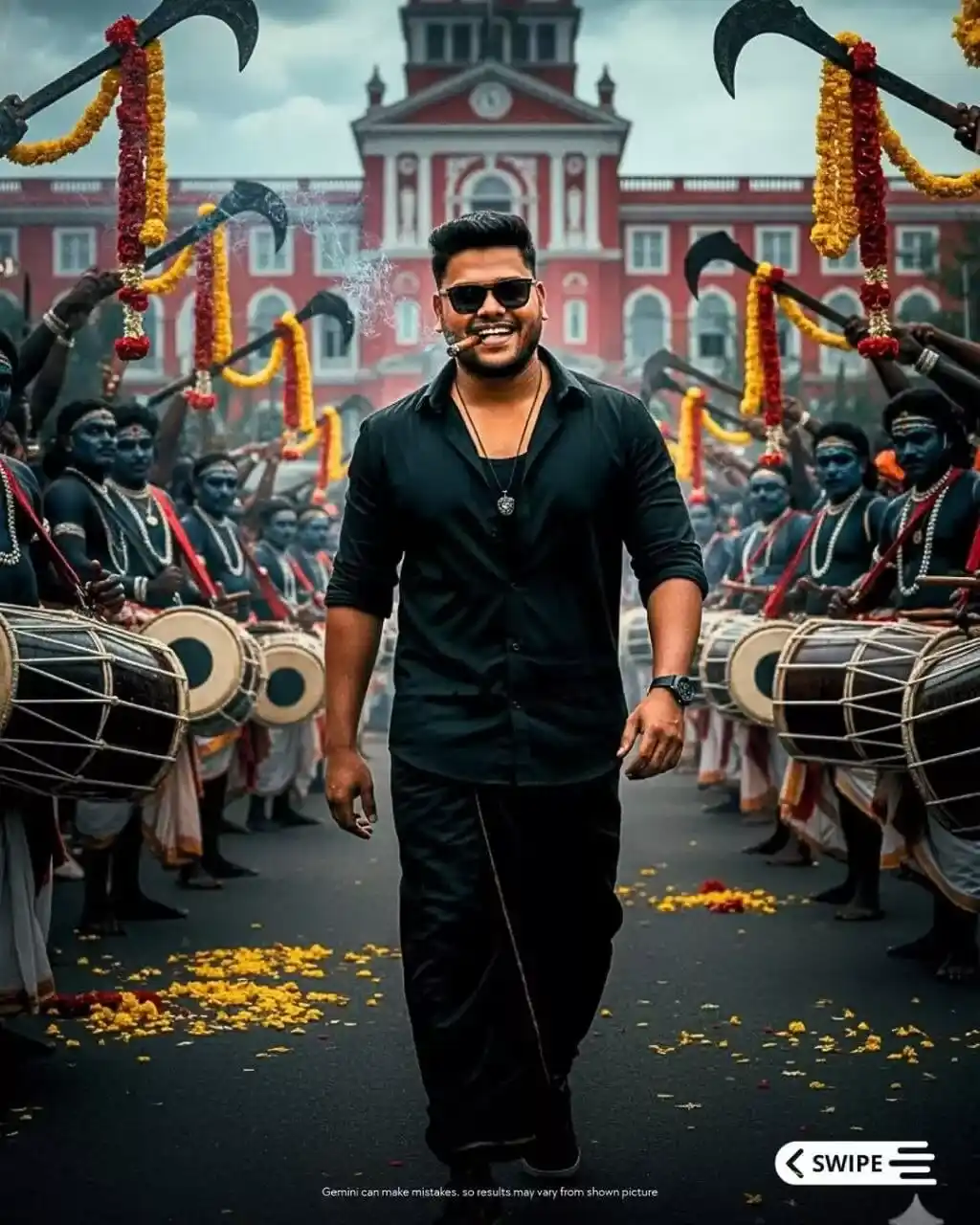
Create a first-look South Indian movie poster, cinematic, ultra-realistic, and photorealistic portrait of a male South Indian actor (mid-20s) walking confidently through a crowded Tamil Nadu street festival procession.
The actor has a fit build, wavy jet-black hair, a full beard and Mustache, and wears dark, thick-rimmed sunglasses.
His expression radiates confidence and swagger, with a subtle smile.
He’s holding a small, dark brown Montecristo cigar in his mouth, with thin trails of smoke curling upwards from both the cigar tip and his exhaled breath, adding a sense of cinematic intensity.
Outfit details:
– Black half-sleeve shirt with the top buttons undone, slightly wrinkled natural fabric.
– Black traditional dhoti/veshti, neatly folded and worn with style.
– Dark sneakers with subtle red accents.
– A dark pendant necklace rests against his chest.
Pose & body language:
Walking directly toward the camera with a relaxed yet powerful stride, head slightly tilted (around 210° downward), arms naturally swinging slightly outward, exuding confidence and charisma.
Background:
A bustling Tamil street procession scene.
– In the distance, a large red-brick colonial-style building with arched windows and detailed architectural carvings.
– Surrounding him, folk performers with elaborate ritual makeup in navy blue, black, crimson red, and yellow, some carrying large traditional drums (parai, tabla) being played energetically, others holding large goddess billhook machetes aloft in a ceremonial manner.
– Bright yellow and red flower garlands and scattered petals fill the air and foreground.
Lighting & atmosphere:
– Natural daylight with diffused cinematic lighting, slightly moody and contrast-rich.
– Half-bright tone, balanced between sunlight and soft shadow for a realistic, filmic atmosphere.
– Air slightly hazy with a faint smoke or dust diffusion from festival drums and incense.
Colour palette:
Dominant deep blacks and muted tones for the actor’s outfit and crowd, contrasted with vibrant reds and yellows from flowers, garlands, and costumes.
Camera setup:
– Low-angle shot, actor centered in frame, walking toward the lens.
– Deep depth of field, keeping both the actor and the detailed background sharply visible.
– Lens: 35 mm cinematic prime, f/4 aperture, 8K ultra-sharp resolution with fine grain and high micro contrast.
Mood & tone:
Dramatic, powerful, and celebratory; evokes pride, tradition, and charisma typical of Tamil mass-hero first look posters.
Render style:
Ultra-photorealistic, hyper-detailed textures — visible skin pores, beard strands, fabric folds, smoke wisps, reflections on sunglasses, flower details, crowd textures — every element rendered in 8K fidelity, 4:5 aspect ratio.
Do not alter the actor’s facial structure (eyes, nose, mouth, eyebrows, ears, jawline) — they should exactly match the reference image provided, except for the wavy hairstyle described above.
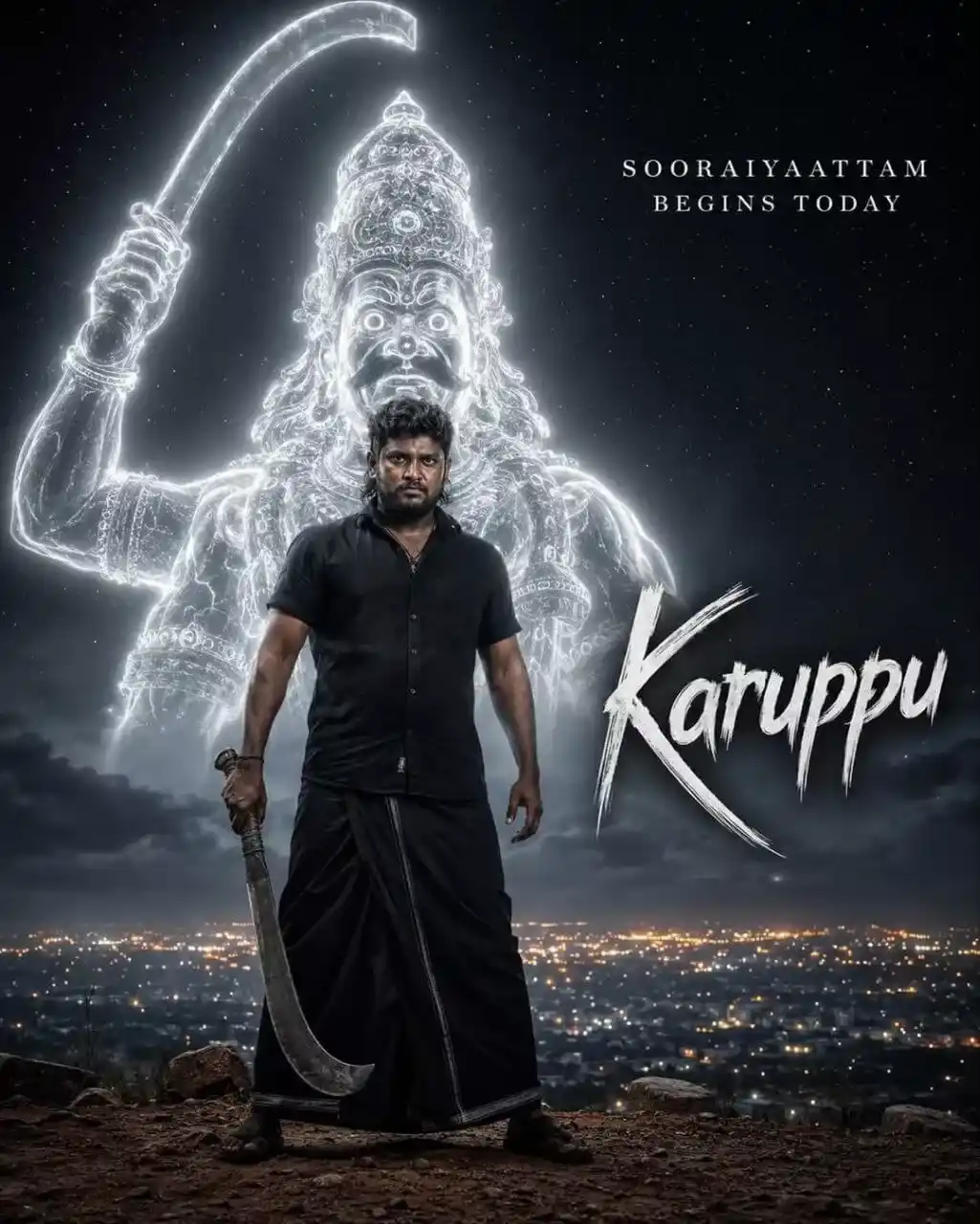
A hyper-realistic, epic cinematic movie poster. In the foreground stands a rugged South Indian man with a thick beard and intense gaze, wearing a dark black half-sleeve shirt and a black dhoti. He stands in a powerful, grounded stance, holding a large, traditional steel curved machete (aruval) pointing downwards in his right hand.
Directly behind him towers a colossal, semi-transparent, glowing spectral figure of a fierce village deity, outlined entirely in radiant, ethereal white light. The glowing deity features a traditional tall crown, wide intense eyes, a fierce mustache, and is raising a giant glowing machete high into the air.
The setting is a moody, expansive starry night sky with subtle volumetric fog. At the horizon, directly behind the man’s legs, lies a sprawling cityscape illuminated by distant, twinkling orange and white city lights.
Text at the top right reads “SOORAIYAATTAM BEGINS TODAY”. A stylized title “KARUPPU” is prominently displayed on the right side.
Shot on a 50mm lens, DSLR, utilizing dramatic cinematic lighting. Deep, moody shadows in the foreground perfectly contrast with the blinding volumetric glow of the spirit behind him. High contrast, 16K resolution, photorealistic masterpiece. 4:5.
How to Use This Karuppu Movie AI Prompt Step by Step
Using the prompt is very simple. Follow these steps:
Open Google Gemini or any AI image tool on your phone or computer.
Find the image generation section or chatbox.
Copy the full AI prompt given above.
Paste it into the tool and press Enter or Generate.
Wait 5 to 10 seconds. Your Karuppu-style poster is ready!
Download the image and share it on Instagram, WhatsApp, or YouTube.
That’s it. No design software. No editing skills. Just one prompt!
How to Add Your Own Face to the Poster
Want to put your face in a Karuppu-style mass hero poster? Here is how:
Using Gemini: Upload your photo first. Then add this line to the prompt: “Use the face from the uploaded photo. Keep the exact face identity, skin tone, and expression. Only change the background and clothing to match the Karuppu movie poster style.”
The AI is designed to preserve your original facial features, skin tone, and expression while transforming the overall style into a cinematic illustration. Your face stays recognizable; the AI only applies color grading, bold outlines, and dramatic lighting.
Tips to Make Your Karuppu Poster Look More Viral
Follow these tips to make your AI poster look even better:
Use specific lighting words. Words like “rim lighting,” “golden hour,” and “dramatic shadows” make your poster look more cinematic.
Mention the color grade. Say “dark teal and orange color grade” or “black and gold theme” to control the mood.
Add text instructions. Tell the AI exactly what text you want on the poster and where to place it.
Request high resolution. Always add “4K,” “ultra HD,” or “high resolution” to your prompt.
Keep the prompt detailed. The best prompt includes character description, cinematic lighting, environment, mood, and poster layout. Structured prompts consistently produce professional results.
Why This Trend Is Great for Content Creators
If you run a YouTube channel, Instagram page, or blog about Tamil movies, this trend is a gold mine for you!
Many viral pages now look like movie campaigns instead of regular profiles. Bloggers and website owners use these AI-generated designs as unique feature images, improving originality, something Google values for content ranking.
Creating Karuppu-style poster edits can:
Get you thousands of views on YouTube Shorts.
Increase your Instagram followers fast.
Make your blog posts more attractive and shareable.
Help you go viral during the movie release season.
Conclusion
The Karuppu movie has given Tamil fans one of the most exciting visual styles of 2026. Now, thanks to AI tools, anyone can create a stunning Karuppu-style mass hero poster in just a few seconds.
Use the AI prompts given in this blog post. Try them on Google Gemini, ChatGPT, or Bing Creator. Experiment with different variations. Share your creations on social media and watch the likes and views grow.
If this post helped you, please share it with your friends. Also, drop your AI-generated Karuppu poster in the comments. We would love to see your creativity!
How to Use Prompt
Step 1: Open Gemini or ChatGPT
Go to the official Gemini or ChatGPT website Or open the Gemini or ChatGPT app on your phone Sign in with your Google account
Step 2: Upload Your Photo
Click on the “+” (upload icon) Select the photo you want to edit Wait for the image to upload
Step 3: Write a Clear Prompt
Now type or paste your photo-editing prompt in the chat box.
Step 4: Generate & Wait
Click the send/generate button Gemini or ChatGPT will process your prompt Wait a few seconds for the generated image.
Step 5: Download the Image
Once satisfied, download your edited photo Use it for Instagram, WhatsApp, or Facebook posts