editorial poster. Keep my face, body, pose, outfit, and original background recognizable, but enhance everything into a luxury fashion campaign aesthetic. Add 4 realistic duplicate versions of me across the frame placed naturally like motion-captured walk sequences. Keep the main/front version largest, sharpest, and most detailed, while side clones are slightly faded or motion blurred. Use dramatic overhead lighting with a subtle glow, deep shadows, long floor shadows, cool-toned cinematic color grading, strong contrast, glossy highlights, and soft film grain. Make the outfit textures crisp and premium. Add bold oversized magazine-style typography in the top corner with one powerful word related to movement or style (example: MOTION, STATIC, RUSH, ECHO). Include smaller minimal text such as collection year, slogan, barcode,…
Motion Blur Ai Photo Editing Prompt – Chatgpt
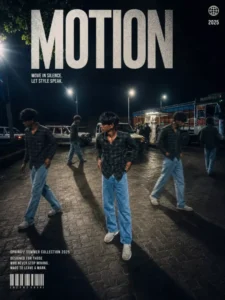
editorial poster. Keep my face, body, pose, outfit, and original background recognizable, but enhance everything into a luxury fashion campaign aesthetic. Add 4 realistic duplicate versions of me across the frame placed naturally like motion-captured walk sequences. Keep the main/front version largest, sharpest, and most detailed, while side clones are slightly faded or motion blurred. Use dramatic overhead lighting with a subtle glow, deep shadows, long floor shadows, cool-toned cinematic color grading, strong contrast, glossy highlights, and soft film grain. Make the outfit textures crisp and premium. Add bold oversized magazine-style typography in the top corner with one powerful word related to movement or style (example: MOTION, STATIC, RUSH, ECHO). Include smaller minimal text such as collection year, slogan, barcode, or campaign details.
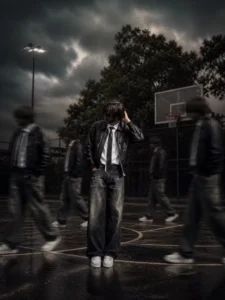
A cinematic streetwear photoshoot of a teenage boy standing on an outdoor basketball court, don't change out fit, face,, head slightly down covering face with hand, natural pose, multiple motion clones of the same person walking around him creating a motion blur effect, dramatic lighting, dark moody sky, high contrast, sharp focus on main subject, depth of field, fashion editorial style, urban environment, trees in background, realistic shadows, 4k ultra realistic, nike style campaign, poster design
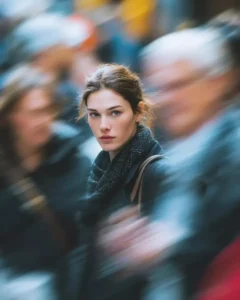
Ultra-realistic cinematic street portrait of a young woman standing still in a crowded city street, sharp focus on her face with calm, intense expression. Long-exposure effect with people moving around her creating strong directional motion blur, streaked crowd movement while the subject remains perfectly still. Natural soft daylight, shallow depth of field, creamy bokeh, realistic skin texture, subtle freckles, neutral makeup, dark winter coat and scarf. Emotional, introspective mood, urban storytelling photography, DSLR quality, 85mm lens look, f/1.8, high dynamic range, 8K, professional color grading.
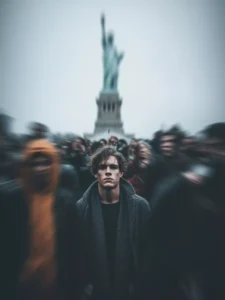
Ultra realistic cinematic portrait of a young man standing still in the center of a crowded street, using the reference image for exact face and identity preservation, sharp focus on the subject’s face, neutral expression, detailed skin texture, natural lighting, shallow depth of field, surrounded by a busy crowd of people moving rapidly around him, strong motion blur effect on all surrounding people, dynamic long exposure style, streaked human figures, sense of chaos and movement, the subject is wearing a dark charcoal overcoat with a black inner shirt, modern minimal fashion, cold color tones, soft diffused daylight, urban environment background, center composition, subject perfectly still and in focus while everything else is blurred, 85mm lens, f/1.8, high dynamic range, 8K ultra HD, cinematic color grading, moody atmosphere, professional photography, extremely detailed, photorealistic
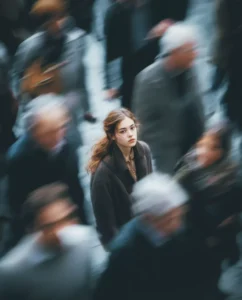
Abstract cinematic glitch collage composed of multiple layered images sliced horizontally, using the reference image for composition style, fragmented visuals showing partial human skin textures, blurred motion strips, and mixed digital artwork elements, horizontal band slicing effect across the frame, each strip showing different distorted visuals, motion blur streaks cutting through the image, smeared transitions between layers, combination of real photo textures and digital illustration interface elements, chaotic composition, overlapping frames, partial visibility of objects and body parts, glitch distortion, datamosh artifacts, frame tearing, visual noise, digital corruption aesthetic, soft lighting mixed with random highlights, experimental modern art style, cinematic look, 8K ultra HD, highly detailed, surreal and abstract
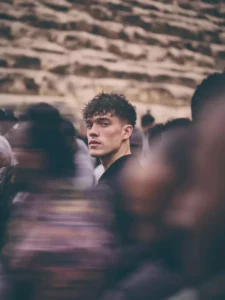
Create using the uploaded reference image. Keep the subject’s face, identity, hairstyle, and facial features EXACTLY the same. Do not change or beautify the face.A young woman standing still in the center of a crowded street, looking directly into the camera with a confident and calm expression.She is wearing a black cropped top, loose black jacket hanging off her shoulders, yellow and black cargo pants with a streetwear style, and a small necklace around her neck. Slightly messy tied hair with natural strands falling on the face.The subject is in ultra-sharp focus with highly detailed skin texture, natural tones, and cinematic lighting with warm highlights on hair and face edges.Surrounding her is a dense crowd of people moving rapidly in all directions. Apply strong motion blur to all surrounding people, creating streaked and ghosted human figures with long exposure effect.The background should feel busy and chaotic, like a street market or festival, with vibrant colors blending due to motion.Use shallow depth of field, 85mm lens look, f/1.8 aperture, HDR, ultra-realistic 8K quality, cinematic color grading.Lighting should be natural golden hour with warm tones, soft shadows, and slight glow on highlights.Do not distort the subject. Maintain realism and sharpness on the face only.
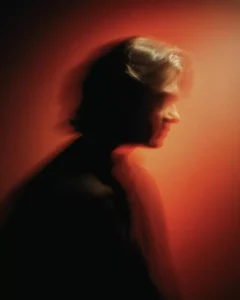
Ultra realistic cinematic portrait of a young man walking slowly, using the reference image for exact face and identity preservation, subject partially sharp with slight motion softness, calm confident expression, detailed skin texture, he is wearing an oversized dark green jacket over a light beige t-shirt, loose black pants, minimal streetwear style, relaxed walking pose, strong horizontal motion blur and neon light streaks passing across the subject from left to right, vibrant orange and red light trails, glowing streak effect, dynamic long exposure photography style, background dark and minimal with gradient tones of green and black, dramatic lighting with warm highlights on the face, high contrast cinematic look, motion trails wrapping around the subject, smooth light diffusion, depth of field, 85mm lens, HDR, 8K ultra HD, filmic color grading, highly detailed, photorealistic
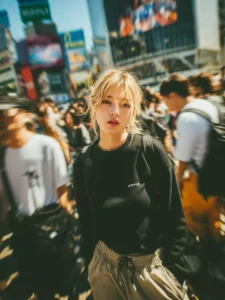
Ultra realistic cinematic portrait of a young woman walking forward in a crowded city street, using the reference image for exact face and identity preservation, subject perfectly sharp and in focus, confident neutral expression, detailed natural skin texture, soft glowing face, she is wearing a loose black sweatshirt, black cargo pants, minimal streetwear fashion, black backpack with straps visible, small pendant necklace, hands in pockets, casual walking pose, surrounded by a dense crowd moving quickly in all directions, strong radial motion blur effect around the subject, long exposure photography style, blurred faces and bodies of people passing by, dynamic sense of motion and chaos, soft golden hour lighting mixed with cool tones, slight hair movement, cinematic depth of field, urban crosswalk background, center composition, 85mm lens, f/1.8, HDR, 8K ultra HD, filmic color grading, highly detailed, photorealistic
How to Use Prompt
Step 1: Open Gemini or ChatGPT
Go to the official Gemini or ChatGPT website
Or open the Gemini or ChatGPT app on your phone
Sign in with your Google account
Step 2: Upload Your Photo
Click on the “+” (upload icon)
Select the photo you want to edit
Wait for the image to upload
Step 3: Write a Clear Prompt
Now type or paste your photo-editing prompt in the chat box.
Step 4: Generate & Wait
Click the send/generate button
Gemini or ChatGPT will process your prompt
Wait a few seconds for the generated image.
Step 5: Download the Image
Once satisfied, download your edited photo
Use it for Instagram, WhatsApp, or Facebook posts