Let the formation be as follows: On the left: a child version of me (from a childhood photo) looking with an innocent smile to the right, with 2004 written above it. On the right: A present version of me (from a recent photo) sits with her hands under her chin and looks at the child with a calm smile wwith2026″ written above her. Studio background: plain and soft (studio background) The lighting: Soft, cinematic, warm (even a black-and-white photo) Style: Professional, minimal emotional photography, focusing on feelings and visual communication between the two versions.Make the picture look so real like abetween the two versions.Make the picture look so real like a real photoshoot.Keep my original features without changing.photo size 9:16
Childhood Vs Present Look Ai Photo Editing Prompts
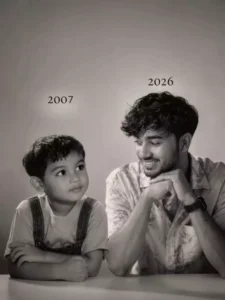
Let the formation be as follows: On the left: a child version of me (from a childhood photo) looking with an innocent smile to the right, with 2004 written above it. On the right: A present version of me (from a recent photo) sits with her hands under her chin and looks at the child with a calm smile wwith2026" written above her. Studio background: plain and soft (studio background) The lighting: Soft, cinematic, warm (even a black-and-white photo) Style: Professional, minimal emotional photography, focusing on feelings and visual communication between the two versions.Make the picture look so real like abetween the two versions.Make the picture look so real like a real photoshoot.Keep my original features without changing.photo size 9:16
Using the images I'm going to upload to create a soft, emotional, black and white art.Let the formation be as follows:On the left: a child version of me (from a childhood photo) looking with an innocent smile to the right, with "1998 written above it.On the right: A present version of me (from a recent photo) sits with her hands under her chin and looks at the child with a calm smile, with "2026" written above her.In the middle: a table with a simple, elegant birthday cake with number 28 on top.Studio background: plain and soft (studio background)The lighting: Soft, cinematic, warm (even a black-and-white photo).Style: Professional, minimal, emotional photography, focusing on feelings and visual communication between the two versions.Make the picture look so real like a real photoshoot.Keep my original features without changing.photo size 4:5
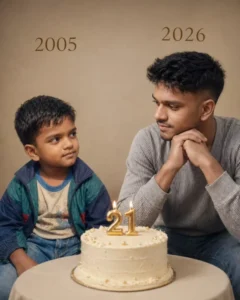
Create a realistic, emotional portrait-style image.Left side: A child version of me (based on a childhood photo), sitting and looking to the right with an innocent, soft smile. Add the year "OLD YEAR" above her.Right side: A present-day version of me (based on a recent photo), sitting with hands gently placed under the chin, smiling calmly and looking at the child. Add the year "CURRENT YEAR" above her. Center: A simple, elegant birthday cake placed (YOUR AGE) on a table between them. Background: Plain, soft studio background with minimal distractions. Lighting: Soft, warm, cinematic lighting (can also work in black-and-white tone). Style: Professional, minimal, emotional photography – focus on connection, eye contact, and feelings between the two versions.Additionalinstructions: Keep facial features natural and unchangedMake it look like a real photoshoot (high realism) Soft shadows, natural skin texture Photo aspect
On the left: The newly wed couple (from a wedding photo)standing and looking with an innocent smile to the right, with 2018 written above it. On the right: A present version of us as a family standing together (from a recent photo in the right) standing and looks at the newly wed couples with a calm smile, with "2026" written above them. In the middle: a table with a simple, elegant birthday cake with number 8 on top. Studio background: plain and soft (studio background). The lighting: Soft, cinematic, warm. Style: Professional, minimal, emotional photography, focusing on feelings and visual communication between the two versions.Make the picture look so real like a real photoshoot. Keep our original features without changing the body shape and facial features. photo size 4:5
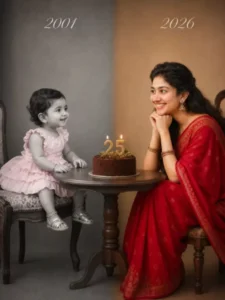
Split-screen studio portrait showing the same person as a child and as an adult, sitting across from each other at a small round wooden table. Left side: Black and white, vintage photo style, year “2001 in elegant script text. Toddler around 1 year old wearing a pink ruffled dress and sitting on a vintage stool. Soft grey studio backdrop.Right side: Full color, modern photo style, year “2026” in elegant script text. Same person now age 25 wearing a red saree, sitting on a stool with chin resting on hands, smiling warmly at her younger self. Warm beige studio backdrop.Center: Simple chocolate birthday cake with “25” candle topper and small greenery on the round wooden table between them.Professional studio lighting, emotional and nostalgic mood, high detail, photorealistic, 85mm lens look, soft shadows. Seamless blend between the two halves.
How to Use Prompt
Step 1: Open Gemini or ChatGPT
Go to the official Gemini or ChatGPT website
Or open the Gemini or ChatGPT app on your phone
Sign in with your Google account
Step 2: Upload Your Photo
Click on the “+” (upload icon)
Select the photo you want to edit
Wait for the image to upload
Step 3: Write a Clear Prompt
Now type or paste your photo-editing prompt in the chat box.
Step 4: Generate & Wait
Click the send/generate button
Gemini or ChatGPT will process your prompt
Wait a few seconds for the generated image.
Step 5: Download the Image
Once satisfied, download your edited photo
Use it for Instagram, WhatsApp, or Facebook posts