Use a real face as reference. Keep background. Warm cozy lighting (slightly golden tone). Add mini 3D chibi characters doing cozy activities (holding coffee, sitting, relaxing, smiling). Add doodles like clouds, hearts, tiny stars, soft lines. Include handwritten text like “cozy,” “relax,” “soft life,” “peaceful.” Style: soft muted pastel tones, glossy chibi, Korean cozy aesthetic, clean layout, 4:5 ratio.
Chibi Cartoon Style Ai Photo Editing Prompts –
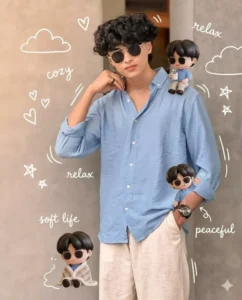
Use a real face as reference. Keep background. Warm cozy lighting (slightly golden tone). Add mini 3D chibi characters doing cozy activities (holding coffee, sitting, relaxing, smiling). Add doodles like clouds, hearts, tiny stars, soft lines. Include handwritten text like “cozy,” “relax,” “soft life,” “peaceful.” Style: soft muted pastel tones, glossy chibi, Korean cozy aesthetic, clean layout, 4:5 ratio.
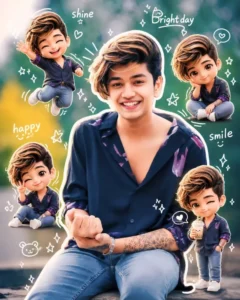
Use a real face as a reference photo.The background is the same as in the photo. The lighting is warm, soft, and clean, with subtle shadows. Around the image, add several mini chibi (3D cute style) versions of the character, while maintaining the original facial features.expressions: jumping cheerfully waving sitting relaxedholding a drink cute and playful expressions Add hand-drawn white doodle elements: outline around the main body stars, hearts, sparkles motion lines small cute icons Add aesthetic handwriting such as: "shine," "bright day," "happy," "smile," etc. (casual doodle font) Overall style: clean & aesthetic composition white sticker outline soft pastel color tone high detail 3D chibi glossy look cute Korean style instagrammable 4:5 ratio
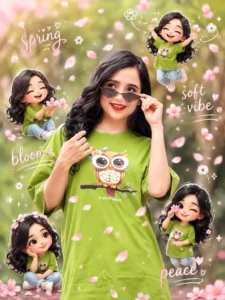
Use a real face as reference. Keep original background. Soft warm lighting with gentle pink tint. Add 3D chibi mini characters playing with falling sakura petals (jumping, catching petals, sitting). Add hand-drawn white doodles like petals, wind swirls, hearts, sparkles. Include handwritten words like “spring,” “soft vibe,” “bloom,” “peace.” Style: Korean aesthetic, pastel pink tones, glossy chibi, soft romantic feel, sticker outline, 4:5 ratio.
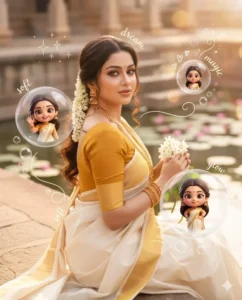
Use a real face as reference. Keep original background. Warm soft lighting with a dreamy glow. Add multiple 3D chibi mini versions of the character interacting with floating transparent bubbles (inside bubbles: smiling, posing, waving). Add glossy reflections and light flares. Include white doodle elements like sparkles, tiny hearts, swirl lines, and bubble trails. Add aesthetic handwritten words like “dream,” “soft,” “glow,” “magic.” Style: pastel dreamy tones, glossy 3D chibi, soft blur highlights, clean Instagram aesthetic, 4:5 ratio.
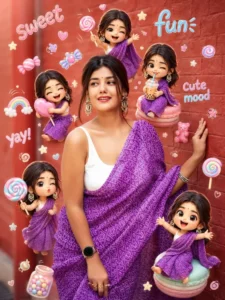
Use a real face as reference. Same background. Bright soft lighting with candy-color highlights. Surround with mini 3D chibi versions holding lollipops, candies, drinks, making playful expressions. Add doodles like candy shapes, stars, swirls, cute icons. Include handwritten text like “sweet,” “fun,” “yay,” “cute mood.” Style: vibrant pastel palette, glossy chibi texture, playful Korean Instagram vibe, clean layout, 4:5 ratio.
How to Use Prompt
Step 1: Open Gemini or ChatGPT
Go to the official Gemini or ChatGPT website
Or open the Gemini or ChatGPT app on your phone
Sign in with your Google account
Step 2: Upload Your Photo
Click on the “+” (upload icon)
Select the photo you want to edit
Wait for the image to upload
Step 3: Write a Clear Prompt
Now type or paste your photo-editing prompt in the chat box.
Step 4: Generate & Wait
Click the send/generate button
Gemini or ChatGPT will process your prompt
Wait a few seconds for the generated image.
Step 5: Download the Image
Once satisfied, download your edited photo
Use it for Instagram, WhatsApp, or Facebook posts