Transform this image into a cinematic, dreamy editorial portrait with soft golden-hour lighting. Apply strongbacklighting from the sun positioned behind the subject, creating a natural rim light around the hair and shoulders.Add a realistic prismatic rainbow lens flare diagonally crossing the frame, with subtle chromatic dispersion and light streak bloom.Enhance depth using shallow depth of field (f/1.8 style), keeping the subject sharp while softly blurring thebackground into a creamy bokeh. Introduce slight motion blur in the environment to create a dynamic, etherealmovement effect while keeping the subject stable.Apply warm, soft color grading with pastel tones, slightly lifted highlights, and gently faded shadows for a filmiclook. Add subtle glow diffusion to highlights (especially around light sources and skin), creating a soft,…
Realistic Sunlight Ai photo Editing Prompts – Chatgpt
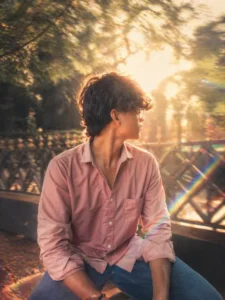
Transform this image into a cinematic, dreamy editorial portrait with soft golden-hour lighting. Apply strongbacklighting from the sun positioned behind the subject, creating a natural rim light around the hair and shoulders.Add a realistic prismatic rainbow lens flare diagonally crossing the frame, with subtle chromatic dispersion and light streak bloom.Enhance depth using shallow depth of field (f/1.8 style), keeping the subject sharp while softly blurring thebackground into a creamy bokeh. Introduce slight motion blur in the environment to create a dynamic, etherealmovement effect while keeping the subject stable.Apply warm, soft color grading with pastel tones, slightly lifted highlights, and gently faded shadows for a filmiclook. Add subtle glow diffusion to highlights (especially around light sources and skin), creating a soft, dreamy hazewithout losing detail.Skin tones should remain natural and clean with soft smoothing, no plastic effect. Maintain realistic textures whileenhancing lighting contrast.Overall style: cinematic photography, luxury fashion editorial, dreamy atmosphere, natural light realism, ultra highresolution, 4K clarity, soft cinematic grain.
A high-resolution, realistic 4k cinematic photo of the young woman from the image at the beach during golden hour. She has the same facial features, dark hair, and soft pink lips. She is smiling playfully with her eyes gently squinted, expressing natural joy. Her wind-blown dark hair is catching the warm sunset light. She is wearing a pista crochet lace top over a black inner layer, with delicate layered gold necklaces and small gold earrings.
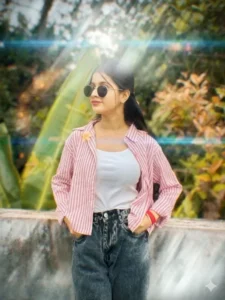
Add a cinematic anamorphic lens flare to this uploaded photo while keeping the subject and composition entirely intact. Identify the brightest light source in the image — whether it's the sun, a window, a street light, a lamp, or any bright highlight – and generate a realistic horizontal anamorphic lens flare emanating from that light source, stretching horizontally across the frame. The flare should have the characteristics of real anamorphic glass: a long horizontal blue-cyan streak stretching across most of the frame width passing through and beyond the light source, secondary smaller warm amber and magenta flare elements scattered along the horizontal axis, and a soft overall haze in the area immediately around the light source that gently reduces contrast. The overall look should feel dramatic, filmic, cinematic, and beautifully shot through a high-end cinema lens.
How to Use Prompt
Step 1: Open Gemini or ChatGPT
Go to the official Gemini or ChatGPT website
Or open the Gemini or ChatGPT app on your phone
Sign in with your Google account
Step 2: Upload Your Photo
Click on the “+” (upload icon)
Select the photo you want to edit
Wait for the image to upload
Step 3: Write a Clear Prompt
Now type or paste your photo-editing prompt in the chat box.
Step 4: Generate & Wait
Click the send/generate button
Gemini or ChatGPT will process your prompt
Wait a few seconds for the generated image.
Step 5: Download the Image
Once satisfied, download your edited photo
Use it for Instagram, WhatsApp, or Facebook posts